PowerShell change command prompt.
Yes, i am talking about the "PS c:\windows\>" looking thingie in the PowerShell console.
May be to hide the path, or if the prompt length has become too lengthy or from influence of a recent hollywood flick where the 'hacker' had his name instead of prompt, we would like to change it..;)
Here is how it could be done.....
PS C:\> # standard prompt which shows console is ready for input..
Windows Powershell, Changing the command prompt to Name.
Try 1:
PS C:\> function prompt {"Hello > "}
Hello > # This becomes the prompt.

Windows Powershell, Changing the command prompt to Null.
Try 2:
PS C:\> function prompt {$null}
PS> # this becomes the prompt you won't see the current working directory anymore.
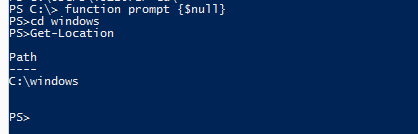
Windows Powershell, Changing the command prompt to Hostname.
Try 3:
function prompt {"PS [$env:COMPUTERNAME]> "}
# shows the hostname of the system

Windows Powershell, Changing the command prompt to date and Time.
Try 4:
function prompt {"$(get-date)> "}
# shows date and time at prompt

Windows Powershell, Changing the command prompt color and attributes.
Try 5:
function Prompt
{
$promptString = "PS " + $(Get-Location) + ">"
Write-Host $promptString -NoNewline -ForegroundColor Yellow
return " "
}
# you could add any color for the prompt to reflect.
# this could be customizable $promptString with anything we like.

Try 6:
function prompt
{
# to reset counter select and execute this > $global:LINE = 0
$global:LINE=$global:LINE + 1
$global:Loc = (get-location)
'PS ' + $($loc) + ' ' + '(' + $($global:LINE) + ')' + $(if ($nestedpromptlevel -ge 1) { '>>' }) + ' > '
}

You could reset the line numbers with reseting the $global:LINE variable to 0 (Zero).
Happy Scripting..

